A few years ago, spotting a fake photo was easy. You looked for bad Photoshop work or strange shadows. Today, one text prompt can create a photo-realistic image in seconds. Remember the viral picture of the Pope in a white puffer jacket? It was made with Midjourney, and millions of people believed it was real.
Text has the same problem. Articles, reviews, and even “expert” advice can now be produced in bulk by machines. In this guide, I’ll show you how to spot AI-generated content using simple steps anyone can follow. No technical skills needed.
Why It Matters More Than Ever in 2026
Search has changed. Google’s AI Overviews now answer many questions directly on the results page, which means more zero-click searches. Brands are also optimizing for GEO (Generative Engine Optimization), hoping AI tools will cite them.
Because of this, the web is filling up with cheap, mass-produced content. Search engines respond by rewarding E-E-A-T: Experience, Expertise, Authoritativeness, and Trustworthiness. Content that shows real, first-hand experience stands out. Human-written content matters more now because readers (and algorithms) are tired of generic answers.
Knowing how to filter fake from real protects you from scams, misinformation, and wasted time.
How to Identify AI-Generated Images
If you want to know how to identify AI-generated images, start with your own eyes. Most fakes still leave clues.
Check the Small Details
Zoom in and look for these red flags:
- Hands and fingers: extra fingers, merged fingers, or odd joints
- Teeth and ears: too uniform, blurry, or mismatched earrings
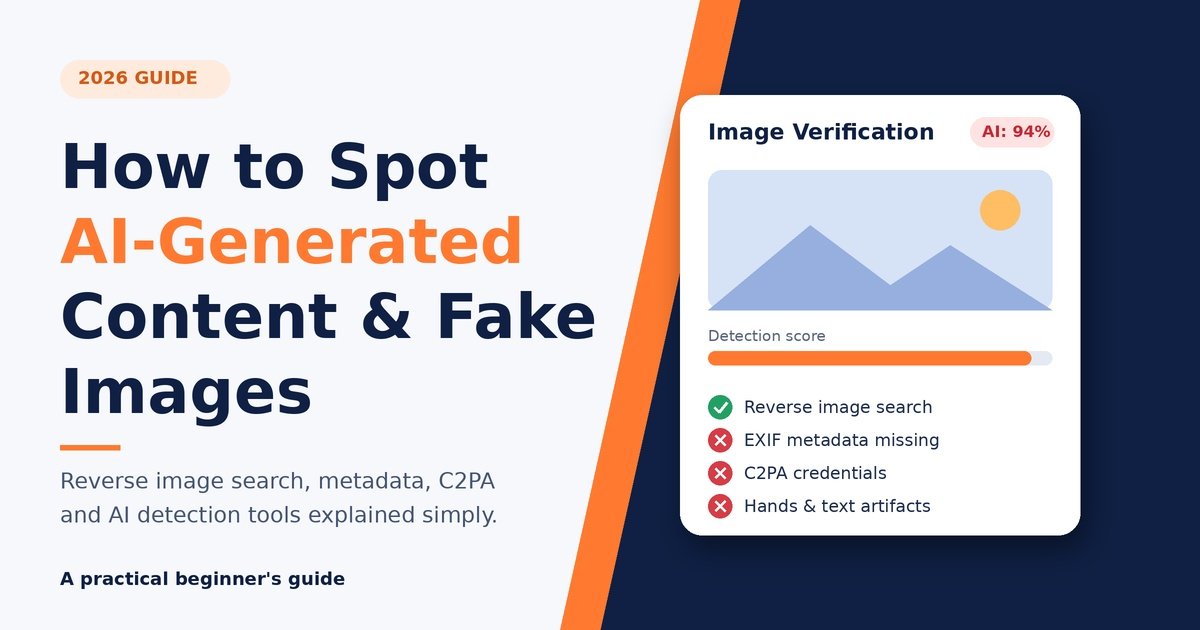
- Text in the image: warped letters, gibberish signs, or misspelled logos
- Skin: overly smooth, almost plastic, with no pores
- Hair: strands that melt into the background or clothing
Look at Lighting and Background
AI often struggles with physics. Shadows may point in different directions. Reflections in glasses or water may not match the scene. Background crowds can look like a blur of half-formed faces.
Know the Style of Each Tool
Different generators have different “fingerprints”:
- Midjourney images often look cinematic, glossy, and almost too perfect.
- DALL·E images can feel illustrated or slightly cartoonish, with soft, clean edges.
- Stable Diffusion images vary widely, but they may show texture glitches or odd anatomy, especially in older models.
Newer versions of all three are improving fast, so no single clue is enough. Combine several checks.
Use Reverse Image Search
This is one of the best fake image detection tools, and it’s free. Upload the image to Google Lens or TinEye. If the photo claims to show a breaking news event but only appears on one random account, be suspicious. If it appears in a fact-check article, you have your answer.
Check Image Metadata (EXIF Data)
Real camera photos often contain EXIF data: camera model, lens, date, and sometimes location. On a computer, right-click the file and open Properties or Get Info.
Keep in mind that missing metadata doesn’t prove an image is fake, because social platforms strip it automatically. But if the metadata mentions an AI tool, you have a clear answer.
Look for an AI Watermark or Content Credentials
Many companies now add invisible or visible marks to AI output. Google’s SynthID is one example. Content Credentials (C2PA) go further by attaching a tamper-evident “nutrition label” that shows how an image was made and edited. You can upload an image to the free Content Credentials Verify tool to see if this information exists.
The limit is that watermarks can be removed, and not every tool uses them.
How to Spot Deepfake Images and Videos
Learning to spot deepfake images is a bit different from catching simple AI art. Deepfakes usually swap or alter a real person’s face or voice. Early in 2024, a fake robocall imitating a US president’s voice told voters to skip a primary. Audio deepfakes can be as convincing as video ones.
For deepfake detection, try this:
- Watch the eyes. Unnatural blinking or a fixed stare is a warning sign.
- Check the mouth. Lip movements may not match the words perfectly.
- Look at the edges. Blurring around the jawline, hairline, or neck often reveals a face swap.
- Listen closely. Flat emotion, odd pauses, and robotic breathing are common in synthetic voices.
- Check the source. Did a trusted news outlet publish it? If not, wait.
Synthetic media is improving quickly, so source-checking is often more reliable than visual inspection.
How to Detect AI-Written Text
Now let’s talk about words. If you’re wondering how to detect AI-written text, there are patterns that experienced editors notice quickly.
Common Signs of AI-Generated Text
- Very smooth, balanced sentences with no personality
- Repeated phrases like “in today’s fast-paced world” or “it’s important to note”
- Lists of three items in almost every paragraph
- Generic advice with no personal story, example, or opinion
- Confident claims with no sources, or made-up facts and links (called hallucinations)
- A neat summary paragraph that repeats everything already said
Spotting ChatGPT-Written Content
ChatGPT-written content tends to sound polite, neutral, and slightly over-explained. It rarely says “I tried this and it failed.” Real writers share messy, specific details: a price they paid, a mistake they made, a place they visited. Ask yourself, “Does this author seem to have actually done this?”
Of course, many people edit AI drafts heavily, so a clean result isn’t always bad. What matters is whether the content adds real value.
Comparison Table: Popular Detection Tools
Here’s a quick look at tools you can try today. Features and limits change often, so always check the latest version.
| Tool | Best For | Free Option | Key Strength |
|---|---|---|---|
| Google Lens | Reverse image search | Yes | Finds where an image first appeared |
| TinEye | Tracking image history | Yes (limited) | Shows older versions of a photo |
| Hive Moderation | AI image detector | Yes | Gives a probability score |
| Content Credentials Verify | Provenance (C2PA) | Yes | Shows edit history if available |
| GPTZero | AI content detector for text | Yes (limited) | Sentence-level highlighting |
| Originality.ai | Publishers and SEO teams | Paid | Detailed reports for articles |
Pros and Cons of AI Detection Tools
Pros
- Fast results in seconds
- Many free options for beginners
- Useful as a first filter before manual checks
- Helpful for editors, teachers, and journalists
Cons
- False positives can wrongly flag real human work
- Can be fooled by edited or paraphrased AI output
- Scores are probabilities, not proof
- Quality drops as generators improve
My advice: use a detector as a hint, never as the final judge.
A Simple 5-Step Checklist for Beginners
Here is how to tell if an image is AI-generated (or a text is machine-made) without any fancy skills:
- Pause. If it triggers a strong emotion, slow down.
- Inspect. Zoom in on hands, text, and backgrounds, or read the article for personality and sources.
- Search. Run a reverse image search or search a key sentence in quotes.
- Verify. Check metadata, Content Credentials, or a trusted fact-checker.
- Confirm with tools. Use an AI image detector or AI content detector as a final check.
Why Human-Written Content Wins
Here’s something I’ve noticed after years of blogging: readers can feel the difference. In an age of AI Overviews and zero-click answers, people click through only when a page offers something extra, like real experience, honest opinions, or original photos.
Strong user experience (UX) matters too. Clear structure, fast loading, and genuine expertise build trust. That’s exactly what E-E-A-T rewards, and it’s why human-written content is becoming a competitive advantage rather than a relic.
Frequently Asked Questions
1. What is the easiest way to spot AI-generated content?
Look for generic wording, missing personal experience, and unverifiable claims. For images, check hands, text, and lighting, then run a reverse image search.
2. Can an AI image detector be 100% accurate?
No. Detectors give probabilities and can make mistakes, especially with edited or compressed images. Always combine them with manual checks.
3. How do I detect fake images for free?
Use Google Lens, TinEye, and the Content Credentials Verify tool. They cost nothing and cover most beginner needs.
4. Does missing EXIF data mean an image is fake?
Not necessarily. Social media platforms and messaging apps often remove metadata automatically.
5. Are AI watermarks reliable?
They help, but they aren’t perfect. Watermarks can be cropped, removed, or never added at all, so don’t rely on them alone.
6. What is C2PA?
C2PA is an open standard behind Content Credentials. It attaches secure information about an image’s origin and edits so viewers can verify it.
7. Can Google detect AI-written text?
Google says it focuses on content quality and helpfulness rather than how content was produced. Low-value, mass-produced pages still tend to perform poorly.
8. How can I spot deepfake images quickly?
Check the eyes, mouth, and edges of the face, then verify the source. If no reliable outlet reports it, treat it as doubtful.
9. Is all AI-generated content bad?
No. AI can be a useful assistant. Problems start when content is deceptive, inaccurate, or published without human review.
10. Which is better: AI content detector or manual review?
Use both. Tools are fast, but human judgment catches context, tone, and logic that software misses.